
2026년 3분기 신규기능(Ver 8.4.0.10 ~ )
Ver 8.4.0.16-20260813-13
1. (Cfg)AISheetSense 추가 — AI 챗 다이얼로그 기능 추가 (관련 아이콘/CSS 포함)
사용하고자 하는 경우 추가 파일이 필요하여 따로 요청이 필요합니다.
IBsheet8 에서 LLM Provider (Openai, Claude, Ollama) 를 활용해 자연어 질의 기능을 이용할 수 있는 챗 다이얼로그를 생성합니다. 시트의 데이터 분석/요약/이상치 탐색이나 필터, 그룹핑, 정렬, Formula(수식 적용 )등 시트 기능을 자연어 질문을 통해 확인하고 제어 할 수 있습니다.
해당 기능은 서버모듈 적용이 필요한 기능입니다.
[사용 예시]
// AISheetSense 사용 설정 options.Cfg = { AISheetSense: 1, // AI 챗 다이얼로그 생성 AIUrl: './api/ai' // 서버 모듈 설정 경로 (기존의 Cfg.Export.Url 과 동일한 경로 설정) }; |
1. Type:Date 컬럼의 밀리초·타임존 지원 확장
- Format/EditFormat 문자열에 밀리초(f)·타임존(z) 토큰 파싱 지원 추가
- (Col)DataFormat에 Object({parse, stringify}) 설정 지원
-> 서버 응답을 사용자 함수로 직접 파싱해 타임스탬프로 변환 가능

[DataFormat 사용 예시]
// DataFormat:Object로 직접 변환 (데이터: '20260121 163151213') { Name: "regDate", Type: "Date", DataFormat: { // 조회 시: 서버 문자열 → 타임스탬프로 리턴 parse: function(str) { var s = ("" + str).replace(/\D/g, ""); return new Date(+s.slice(0,4), +s.slice(4,6) - 1, +s.slice(6,8), +s.slice(8,10) || 0, +s.slice(10,12) || 0, +s.slice(12,14) || 0, +s.slice(14,17) || 0); }, // 저장 시: 타임스탬프 → 서버 전송 문자열 리턴 stringify: function(date) { var p = function(n, w) { return ("00" + n).slice(-(w || 2)); }; return "" + date.getFullYear() + p(date.getMonth()+1) + p(date.getDate()) + " " + p(date.getHours()) + p(date.getMinutes()) + p(date.getSeconds()) + p(date.getMilliseconds(), 3); } }, Format: "yyyy-MM-dd HH:mm:ss.fff" } |
Ver 8.4.0.14-20260730-13
1. setFormulaRow에 5번째 인자 noclear 추가
기존에는 setFormulaRow로 특정 컬럼에 수식을 설정하면 이미 설정되어 있던 다른 컬럼의 수식이 모두 초기화되었습니다. 사용의 편의성을 위해 5번째 인자로 noclear가 추가되었으며, true로 설정하면 기존 컬럼의 수식은 그대로 유지하고 지정한 컬럼만 갱신할 수 있습니다.
[사용 예시]
// A 컬럼에만 Sum 수식 설정, 나머지 컬럼의 기존 수식은 유지 sheet.setFormulaRow("Sum", "A", 1, 1, 1); // A 컬럼에만 Sum 수식 설정, 나머지 컬럼의 기존 수식은 유지 sheet.setFormulaRow({ val: { "A": "Min", "B": "Min" }, visible: 1, render: true, noclear: true // 기존 다른 컬럼 수식 유지 }); |
Ver 8.4.0.13-20260723-14
1. 셀 데이터 복사 시 행 끝에 붙던 \r\n을 제거하는 (Cfg) NoCRLF 옵션 추가
기존 Excel 동작과 동일하게 복사 붙여넣기 시 행 마지막에 \r\n이 붙도록 설계가 되었습니다.
이 \r\n를 제거하고자 하는 요건이 존재하여 컨트롤 가능한 (Cfg)NoCRLF 가 추가되었습니다.
NoCRLF:true 를 사용하면 행 끝 줄바꿈이 제거됩니다.
여러 셀 선택 또는 데이터 내 줄바꿈에 의한 줄바꿈은 기존과 동일하게 유지됩니다.
[사용 예시]
options.Cfg = { NoCRLF: true // 복사 시 행 끝 \r\n 제거 }; |
Ver 8.4.0.12-20260716-13
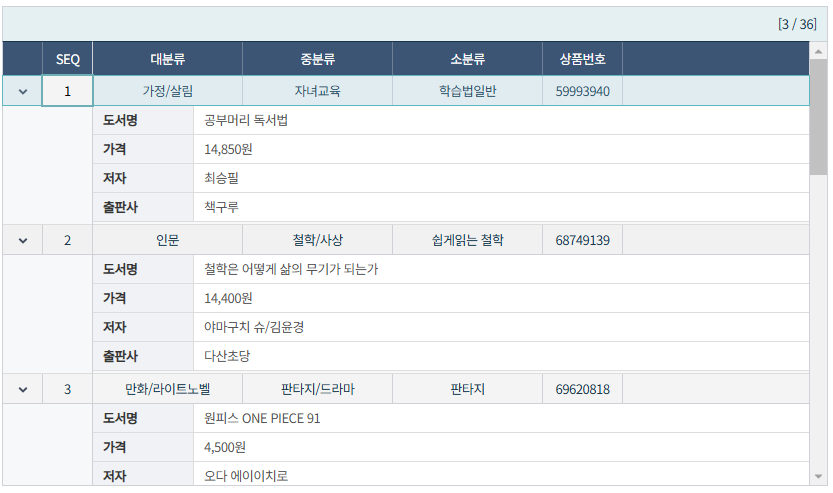
1. 브라우저 너비에 따라 컬럼을 자동으로 숨기고 sub-row로 확인할 수 있는 반응형 컬럼 (Cfg) ResponsiveCol 기능 추가
시트 너비가 좁아지면 우선순위가 낮은 컬럼이 자동으로 숨겨지고, 숨겨진 데이터는 확장 가능한 sub-row에서 확인할 수 있는 Cfg.ResponsiveCol 기능이 추가되었습니다.
SearchMode:2 조회 전용이며, 서브옵션 HeaderColor/HeaderWidth/Expanded를 지원합니다.
| value | description |
|---|---|
| true/false | 반응형 컬럼 사용 여부 |
| Object | 반응형 컬럼 관련 상세 설정 |
[Object 설정]
| value | type(defalut) | description |
|---|---|---|
| HeaderColor | Color String(#f0f2f5) | 서브 로우 헤더 색상 |
| HeaderWidth | Int(100) | 서브 로우 헤더 텍스트 영역 너비 |
| Expanded | boolean(false) | 서브 로우 표출 시 기본 펼침 여부 |
제약 사항은 아래와 같습니다.
[제약사항]
SearchMode:2인 단순 조회용 시트에서만 사용 가능sub-row편집 불가- ResponsiveCol 설정 시
DataMerge:0자동 설정,setMergeRange사용 불가 FitWidth,RelWidth사용 불가- 소계, 합계, Solid, Foot, Head 행 사용 불가
- 멀티레코드, 그룹시트, 트리시트 사용 불가
[사용 예시]
options.Cfg = { ResponsiveCol: true // 또는 상세 설정 // ResponsiveCol: { // HeaderColor: '#f0f2f5', // HeaderWidth: 100, // Expanded: false // } }; |
[사용 화면]
[CSS 추가]
각 테마별 css에 다음 규칙이 추가되었습니다.
| .IBResponsiveToggleIcon { display: inline-block !important; width: 16px !important; height: 16px !important; min-width: 16px; min-height: 16px; cursor: pointer; vertical-align: middle; background-repeat: no-repeat !important; background-position: center center !important; background-size: 12px 12px !important; user-select: none; } .IBMain .IBResponsiveSubRow { background: #f7f8fa; } .IBMain .IBResponsiveSubRow > td { padding: 0 !important; border-bottom: 1px solid #ddd; } .IBMain .IBResponsiveSubRowContent { padding: 0; width: 100%; box-sizing: border-box; } .IBMain .IBResponsiveSubGrid { border-collapse: collapse; font-size: 12px; table-layout: fixed; width: 100%; } .IBMain .IBResponsiveSubGrid > tbody > tr > td, .IBMain .IBResponsiveSubGrid > tr > td { border-bottom: 1px solid #ddd; } .IBMain .IBResponsiveSubGridLabel { background: #f0f2f5; font-weight: 600; color: #333; white-space: nowrap; width: 80px; overflow: hidden; text-overflow: ellipsis; padding: 5px 10px; border-right: 1px solid #ddd; } .IBMain .IBResponsiveSubGridValue { background: #fff; color: #555; text-align: left; padding: 5px 10px !important; border-right: 0 !important; } .IBMain .IBResponsiveSubGridValue > * { text-align: left !important; } .IBMain .IBResponsiveSubGridValue table { margin: 0 !important; } .IBMain .IBResponsiveSubGridValue .IBCellBase { border: 0 !important; } .IBMain .IBResponsiveSubGridValue u.IBSheetButton, .IBMain .IBResponsiveSubGridValue button.IBSheetButton, .IBMain .IBResponsiveSubGridValue button.IBRightButton { display: inline-block !important; width: auto !important; min-width: 60px; height: 16px; max-height: 16px; padding: 0 12px !important; margin: 0 !important; vertical-align: middle !important; text-align: center !important; line-height: 16px !important; } .IBMain .IBResponsiveSubGridValue u { display: inline-block !important; max-height: 16px !important; line-height: 16px !important; margin: 0 !important; vertical-align: middle !important; } |
Ver 8.4.0.11-20260709-13
1. Enum 리스트 표출 방향을 강제로 지정할 수 있는 Col.EnumExpand 옵션 추가
기존에는 Enum 리스트 표출 위/아래 방향이 자동 계산되어 원하는 방향으로 강제할 수 없었습니다. Col.EnumExpand으로 표출 방향을 강제 지정할 수 있습니다.
[사용 예시]
{ Header: "종류", Type: "Enum", EnumExpand: "Up" // "Up" = 위 강제, "Down" = 아래 강제 } |
2. 다이얼로그 관련 템플릿 폴더/파일 누락 시 출력하는 locale 메시지 추가
다이얼로그 템플릿 폴더 또는 html 파일이 없을 때 출력할 메시지가 로케일 파일에 추가되었습니다.
| "Lang" : { "Dialog" : { ... // ko, en, jp, cn 에 모두 추가 // ko "NoTemplate" : "템플릿 폴더 또는 파일이 존재하지 않습니다. (%1)", // en "NoTemplate" : " The template folder or file does not exist. (%1)", // jp "NoTemplate" : " テンプレートフォルダまたはファイルが存在しません (%1)", // cn "NoTemplate" : " 模板文件夹或文件不存在 (%1)", ... } } |
Ver 8.4.0.10-20260702-15
1. exportData CSV 다운로드 시 CSV Injection(수식 인젝션) 방어를 위한 escapeCsvInjection 옵션 추가
CSV 파일 다운로드 시 셀 값이 수식·명령으로 해석될 수 있는 문자(=, +, -, @ 등)로 시작하는 경우 앞에 작은따옴표(')를 붙여 텍스트로 강제하여 CSV Injection 공격을 방어합니다.
기본값은 false이며, 사용자가 옵션을 활성화한 경우에만 동작합니다. CSV 다운로드에만 적용되며 xlsx / xls 는 대상이 아닙니다.
[사용 예시]
sheet.exportData({ type: 'csv', escapeCsvInjection: true // CSV Injection 방어 활성화 }); |